H
Learn about the Head model and other setting categories starting with H in Clip Studio Paint.
Hand model
Adjust the hand type or register a new shape as a material when a 3D hand or character is selected with the Object tool.
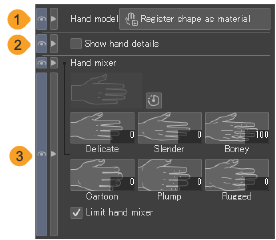
(1)Register shape as material (PRO/EX)
You can save your custom hand shape as a new material.
(2)Show hand details
When turned on, a guide texture will appear on the 3D hand model.
(3)Hand mixer
Adjust the hand type. See "Combining hand shapes"for details.
Hand pose
Adjust the hand pose when a 3D hand, 3D drawing doll, or character is selected with the Object tool.
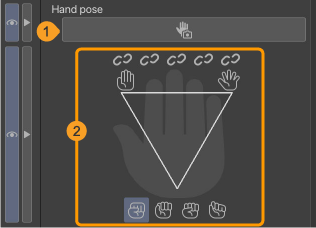
(1)Hand Scanner
Tap to launch the "Hand Scanner" to pose the hands using the camera feed.
(2)Hand setup
Use this to pose the hands and fingers. For details, see "Adjusting the hand pose".
Head model
Adjust settings for the head model when it is selected with the Object tool.
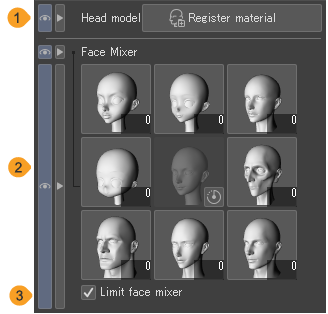
(1)Head model
Register the 3D head model as a new material.
(2)Face mixer
Adjust the face mix of the head model. See "Face Mixer" for details.
(3)Limit face mixer
Turn this on to limit the face mixer from extreme distortion.